
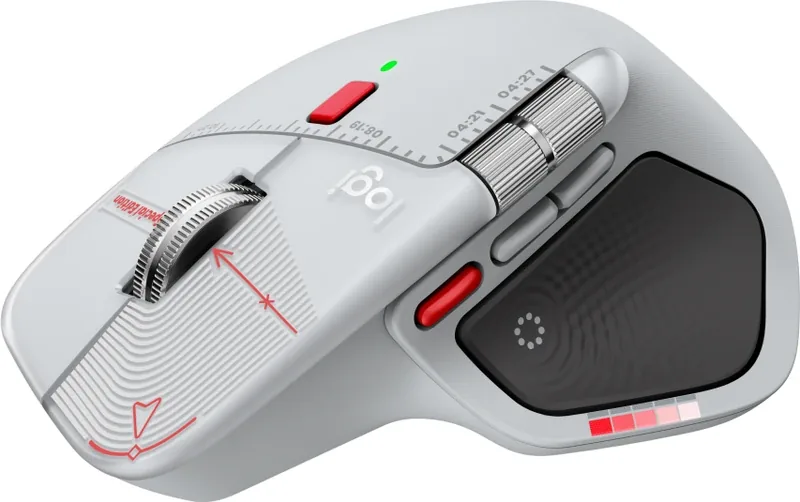
Logitech MX Master 4 SE (Creator) Wireless Ergonomic Optical Mouse (Multicolor)
The Logitech MX Master 4 SE (Creator) combines ergonomic comfort, haptic controls, precise 8,000 DPI tracking and up to 70 days of battery life.
Marketplace Price Comparison
| Merchant | Price | List Price (MRP) | Availability | Action |
|---|---|---|---|---|
| FlipkartLowest Price | ₹12,995 | ₹15,995 | In Stock | Buy on Flipkart |
* Outbound links are tracked redirect endpoints. Prices and availability are verified against merchant feeds and confirmed at checkout.
Price History & Deal Tracker
Verified multi-merchant price trends over the last 30 days
About This Product
The MX Master 4 SE (Creator) is an ergonomic wireless mouse designed to support a natural hand posture during long work sessions. Its 128.15 mm by 88.35 mm by 50.8 mm form measures 150 g and pairs intuitive buttons with a thumbwheel for comfortable, fluid navigation. Quiet Clicks are described as reducing click noise by 90%, while built-in haptic feedback adds tactile responses to selected actions and notifications. Rather than a screen or audio system, its focus is on considered physical controls and feedback at the cursor.
For precise everyday control, the Darkfield High Precision sensor offers a resolution range of 200 to 8,000 DPI and is described as tracking on glass and other surfaces. The MagSpeed wheel can scroll up to 1,000 lines per second or stop with pixel-level precision. Eight controls include left and right click, back and forward, gesture, wheel mode-shift, middle click and Actions Ring; the Actions Ring provides customizable shortcuts near the cursor. Bluetooth Low Energy and the included USB-C Bolt receiver offer wireless connection options, and the mouse is compatible with supported Windows, macOS, Linux, ChromeOS, iPadOS and Android devices. Advanced customization requires Logi Options+ on supported Windows and macOS versions.
A rechargeable 650 mAh battery is rated for up to 70 days of use. Logitech also states that a one-minute charge can provide up to three hours of use, and the charging cable is not included. The listed wireless range is 10 m. The product description notes recycled materials, including recycled cobalt in the battery. With customizable controls, long stated battery life and both Bluetooth and receiver connectivity, this mouse is suited to productivity-focused workflows; it is not positioned as a gaming mouse, and its weight is not adjustable.
Verified Technical Specifications
| Brand | Logitech |
| System Requirements | Bluetooth: Required: Bluetooth Low Energy, Windows 11 or later*, macOS 13 or later*, Linux**, ChromeOS**, iPadOS 15 or later**, Android 12 or later**. (*Customize device by installing the Logi Options+ App available for recent versions of Windows and macOS at app.logi.com, **Device basic functions will be supported without software for other systems than Windows and macOS) Logi Bolt USB receiver: Required: USB-C Port, USB-A Port, Windows 10, 11 or later*, macOS 13 or later*, Linux**, ChromeOS**. (*Customize device by installing the Logi Options+ App available for recent versions of Windows and macOS at app.logi.com, **Device basic functions will be supported without software for other systems than Windows and macOS) |
| Technology Used | Bluetooth Low Energy Darkfield High Precision Sensor Technology |
| Form Factor | Ergonomic |
| Sales Package | Mouse USB-C Bolt receiver User documentation |
| Resolution | 200-8000 DPI |
| Controls | Ultra fast scroll 1000 lines per second and stop on a pixel with the MagSpeed scroll wheel - Logitech's fastest, quickest, and most precise scrolling experience |
| Adjustable Weight | No |
| Lighting | Red=low battery, Green=full battery |
| Compatible Devices | Bluetooth: Required: Bluetooth Low Energy, Windows 11 or later*, macOS 13 or later*, Linux**, ChromeOS**, iPadOS 15 or later**, Android 12 or later**. (*Customize device by installing the Logi Options+ App available for recent versions of Windows and macOS at app.logi.com, **Device basic functions will be supported without software for other systems than Windows and macOS) Logi Bolt USB receiver: Required: USB-C Port, USB-A Port, Windows 10, 11 or later*, macOS 13 or later*, Linux**, ChromeOS**. (*Customize device by installing the Logi Options+ App available for recent versions of Windows and macOS at app.logi.com, **Device basic functions will be supported without software for other systems than Windows and macOS) |
| Color | Multicolor |
| Gaming | No |
| Wired/Wireless | Wireless |
| Interface | Bluetooth |
| Key Features | 1) Precision you can feel with the Haptic Sense Panel; customizable haptic feedback on specific actions, shortcuts, notifications enhancing productivity on this wireless Bluetooth mouse. 2) Effortlessly access favorite tools with Actions Ring on this MX Series mouse—a dynamic, customizable overlay adapts to each app, placing most used filters, adjustments, and shortcuts at your cursor. 3) Enjoy 2X more powerful connectivity with a USB-C dongle, advanced radio chip, and optimized antenna for faster, stronger, reliable performance—or use Bluetooth for more versatility. 4) Ergonomic mouse designed for comfort, MX Master 4 keeps you in flow with a natural tilt, intuitive buttons, and a thumb scroll wheel that reduces hand stress for fluid navigation. 5) Quiet Clicks on MX Master 4 reduce noise and distractions, offering a soft, satisfying feel with 90% less click noise —perfect for focused workflows 6) Get a complimentary 1-month Adobe Creative Cloud subscription with your purchase of MX Master 4 |
| Other Features | Controls Number of buttons: 8 (left/right-click, back/forward, gesture, wheel mode-shift, middle click, Actions Ring) Scroll wheel: Yes Horizontal scroll: Yes Thumbwheel: Yes Actions Ring Built-in haptic feedback Customization app: Logi Options+(5) and basic support in Logi Tune |
| Width | 88.35 mm (8.83 cm) |
| Depth | 50.8 mm (5.08 cm) |
| Height | 128.15 mm (12.82 cm) |
| Weight | 150 g |
| Bluetooth Version | 5:01 |
| Effective Range | 10 m |
| USB Type | USB - A & USB - C |
| Battery Life | 70 days |
| Number Of Batteries | 1 |
| Power Source | Battery |
| Battery Type | Rechargeable 650mAh |
| Surface Tracking | Yes |
| Bluetooth | Yes |
| Part Number | 910-008022 |
| Model Name | MX Master 4 SE (Developer) |
Verified Sourced Advantages
- •Ergonomic form with a thumbwheel and intuitive controls for comfortable navigation.
- •Darkfield sensor offers 200–8,000 DPI tracking and is described as working on glass.
- •MagSpeed wheel scrolls up to 1,000 lines per second and supports precise stopping.
- •Haptic feedback and customizable Actions Ring shortcuts support productivity workflows.
- •Up to 70 days of stated battery life, with a one-minute charge providing up to three hours of use.
- •Supports Bluetooth Low Energy and includes a USB-C Bolt receiver.
Known Disadvantages & Compromises
- •The charging cable is not included.
- •Advanced customization requires Logi Options+ on supported Windows and macOS versions.
- •It is not designated for gaming, and its weight cannot be adjusted.
- •The charging cable is not included.
- •Advanced customization requires Logi Options+ on supported Windows and macOS versions.
- •It is not designated for gaming, and its weight cannot be adjusted.
Frequently Asked Questions
Verified Customer Ratings & Reviews
Real customer feedback and ratings from verified buyers.
No reviews yet
Have you used this product?
Sign in to your CrushPrice account to rate and submit your review. All shoppers can read customer reviews below.
Customer Feedback(0 reviews)
Loading customer reviews...
Related & Similar Products
Compare prices and specifications across related devices in Computer Peripherals, Keyboards & Mice.
Lowest Verified Price